Beauty Scanner - Face Score AI
- 3.6
- Rating
- 5.00M
- Installs
- Free
- Price
 Analysis by App-foxy
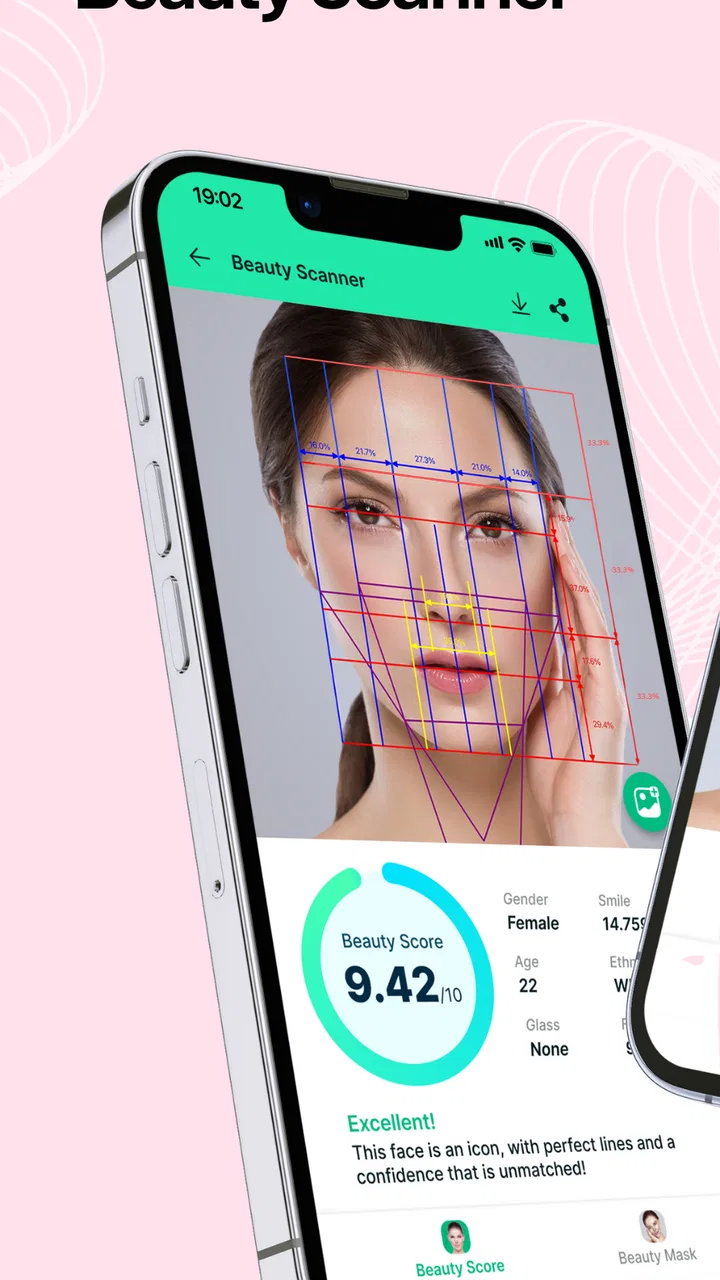
I tried Beauty Scanner - Face Score AI as a lightweight photography app built around facial analysis rather than ordinary camera editing. Its main appeal is curiosity: you take or select a face image, let the app assess visual traits, and receive a score-oriented result connected to ideas such as facial symmetry and the golden ratio. I found that concept easy to understand, but also easy to take too seriously, so the most important part of using it is knowing what the result can—and cannot—tell you about a real person.
The app comes from Face Technology Company and is listed as free, with optional in-app purchases ranging from $1.99 to $39.99 per item. It sits in the Photography category, carries an Everyone age rating, and supports devices running Android 7.0 or later. That combination makes it accessible to a broad audience, although the purchase range means I would still pay attention to every screen before confirming anything.
What the face analysis feels like in everyday use
The first thing I noticed is that Beauty Scanner is not trying to replace a full photo editor. It is more of a playful analysis tool. Instead of asking me to adjust exposure, crop a portrait, or remove distractions, it focuses attention on the face itself and turns an image into an interpretation. That makes it a better fit for experimentation than for serious photography work.
You May Also Like

 Blood Strike: 2.5 Anniversary
Blood Strike’s Loadouts Turn Every Drop Into a Tactical Gamble
A close look at Blood Strike’s custom loadouts: how fast access to signature weapons reshapes its battle royale rhythm, rewards preparation, and narrows the gap between fights.

 Pandora - Music & Podcasts
Pandora’s Music Is Easy to Start, but Harder to Recover
Pandora’s strength is its low-effort path from a seed to a station. Its weak spot is how much confidence it asks you to place in connection, setup, and quiet recovery.

 8 Ball Pool
 Is Built on Rivalries, Rematches, and Routine
A close look at the rivalries, rematches, shared routines, and unanswered safety questions that turn a quick pool match into a persistent mobile community.

 Samsung Music
’s Quiet Strength Is Playing What You Already Own
Its reach comes less from spectacle than from dependable access to a personal library. That simplicity is both the app’s strongest retention engine and its ceiling.

 AccuWeather: Weather Radar
AccuWeather Review: A Quick, Clear Forecast for Everyday Decisions
For everyday plans, the best forecast is the one you can understand quickly. AccuWeather makes rain timing, radar, and local conditions easy to act on, with a few trade-offs.

 Hill Climb Racing
Why Hill Climb Racing Still Turns Crashes Into One More Run
A tiny car, a bumpy hill and one more upgrade: Hill Climb Racing keeps resurfacing because its simple chaos makes every near-miss feel personal.
More From Our News Desk



A realistic use case is taking a portrait before choosing a profile picture. I could compare a few images with similar lighting and framing, then use the results as a prompt to notice practical differences: whether my face is turned too far, whether one side is in shadow, or whether the camera is too close. The useful part is not treating the score as an objective verdict. It is using the process to become more deliberate about how a portrait is composed.
I would also describe it as a conversation app. Friends may enjoy testing different expressions or comparing how the same face looks under different conditions. That can be entertaining for a few minutes, especially when nobody treats the output as a serious judgment. The experience becomes less helpful when a single number starts affecting someone’s confidence.
Why the input photo matters more than the result suggests
Face analysis is especially sensitive to the image that goes in. A tilted head, uneven lighting, sunglasses, a partially covered face, strong shadows, or an unusual camera angle can change the visible features that the app examines. Even without changing anything about a person, moving from a bright window to a dim room can produce a noticeably different impression.
My practical advice is to test only images that are reasonably consistent. Use a clear face, keep the head mostly straight, avoid dramatic filters, and compare results from the same session rather than treating unrelated photographs as a scientific experiment. This is one of the less obvious trade-offs: the app may encourage repeated testing, but repeated testing with inconsistent photos mostly measures photo conditions.
Another useful habit is to separate the app’s entertainment value from its beauty language. Symmetry and proportion can be interesting visual concepts, but they do not capture personality, expression, style, or the way a person appears in real conversation. A portrait with a lower result may still be the better image because it feels natural and communicates more.
Where it differs from ordinary camera and editing apps
Compared with a standard camera app, Beauty Scanner is more interpretive and less practical. A camera gives me direct control over focus, exposure, framing, and sometimes color. This app instead gives me feedback after the image exists. If my goal is to produce a polished photograph, I would start with the camera and an editor, not with a facial score.
Compared with beauty filters, it also serves a different purpose. Filters change the appearance of a picture, while this experience is centered on evaluating the face in the picture. That distinction matters because an editing app gives me visible controls: I can decide how much smoothing or reshaping to apply. A score-based tool can feel more authoritative even though the underlying result is still dependent on the selected image and the app’s interpretation.
For someone who wants a quick, playful portrait experiment, that narrow focus is a strength. For someone looking for retouching, lighting correction, background removal, or professional camera controls, it is the wrong category of tool. I would not install it expecting a complete portrait workflow.
Trust starts with what the app visibly asks me to do
Because the subject is a face image, I would use a more cautious mindset than I would with a simple sticker or wallpaper app. Before selecting a photo, I would read the visible prompts carefully and check whether the app asks for camera or photo access at that moment. I would also notice whether the choice is clearly explained, whether Android presents a permission dialog, and whether I can continue without granting access I do not need.
I do not treat a permission request as proof that an app is unsafe, but I also do not approve access automatically. A sensible workflow is to choose a test image that contains no other people, documents, children, location clues, or private surroundings. That reduces the consequences of making a mistake while I learn how the app behaves.
The same caution applies to account controls and purchase screens. I would look for whether the app lets me use its basic experience without creating an account, whether any sign-in choice is optional, and whether a purchase is clearly separated from a free action. The free label is useful, but it should not be read as meaning every result or tool is necessarily included without charge.
Handling face photos with more care
A face photograph is personal even when it looks ordinary. Before uploading or selecting one, I would ask whether I am comfortable using that exact image for analysis. I would avoid testing a friend’s photo without permission, and I would not use an image that includes private information in the background. These are simple steps, but they are more important here than in many casual photography apps.
I would also pay attention to the app’s visible privacy explanations and system controls rather than relying on assumptions. If the app shows a privacy notice, I would read how it describes image handling, storage, and deletion. If Android offers permission management, I would revisit it after testing and remove access that I no longer want to leave enabled. The safest habit is to make a deliberate choice at every point where a face image or account action is involved.
That approach also helps answer a common practical question: can I use the app responsibly without handing over every photo on my phone? I would begin with a single, non-sensitive image and grant only the access needed for that specific task. If the experience does not make that choice clear, I would stop and reconsider rather than importing a whole library.
Keeping control over the experience
User agency matters because score-based apps can create pressure to keep checking. I would set a simple boundary before using it: test a small number of comparable photos, note what changes visually, and stop when the results become repetitive. There is little value in chasing a higher number by changing lighting, angle, or expression again and again.
I would treat the output as a suggestion for improving photography, not as a measurement of personal worth. For example, if one image produces a more favorable result, I might inspect its framing and light. I would not conclude that my face has become more or less attractive between two pictures. This distinction is especially important for younger users, even though the app is marked suitable for Everyone.
Purchases deserve the same deliberate approach. Since optional items can cost from a small amount to a considerably larger one, I would check what each purchase unlocks, whether it is a one-time item or part of an ongoing arrangement, and whether the device’s confirmation screen matches what I intended. I would not tap through a result screen quickly just to see what comes next.
If someone else is using my phone, I would make sure purchase authentication is enabled through the device’s normal controls. That is a practical safeguard for families, particularly when an app is approachable enough for a child to explore. The age rating does not remove the need for supervision around photos, permissions, or payments.
What I liked about the focused design
The strongest part of Beauty Scanner is its clear premise. I do not have to learn a complicated editing timeline or understand professional photography terminology. The experience is aimed at one question: what does this face image look like through the app’s scoring lens? That focus makes it approachable for casual users who want an immediate experiment.
I also like that it can encourage better portrait awareness when used sensibly. Comparing a straight-on image with a poorly angled one can reveal how much composition affects a face. Looking at symmetry-related feedback may prompt me to improve lighting or camera placement instead of applying a heavy filter. That is a more constructive use than simply chasing a flattering result.
The app’s popularity suggests that this idea has broad curiosity appeal. It has passed five million installs, carries an average rating of 3.6 from around forty-three thousand ratings, and has hundreds of written reviews. I read those figures as a mixed signal: enough interest to show that people understand the concept, but not a reason to assume every user will find the analysis consistent or personally useful.
Where I felt friction
The biggest limitation is the gap between numerical confidence and real-world meaning. A score can look precise while still depending heavily on the chosen photo. Without a controlled setting, two results may say more about lighting and pose than about the face itself. Anyone expecting an objective standard of attractiveness is likely to be disappointed.
The purchase structure is another point where I would slow down. The app is free to install, but optional items have a wide price range. That does not automatically make the experience poor, yet it means the free path and paid path should be kept distinct in my mind. I would not assume that every appealing result, extended analysis, or extra option is included simply because the initial download costs nothing.
I also would not choose it for privacy-sensitive professional work. A photographer preparing a client portrait needs predictable editing controls and a clear workflow, not a playful score. Likewise, anyone who is uncomfortable selecting face photos for analysis should skip the experiment altogether. No curiosity-based result is worth ignoring a personal boundary.
Who should try it, and who should pass
I think it suits adults and older teens who enjoy experimenting with portraits, understand that the output is subjective, and are willing to review permissions and purchase prompts carefully. It can also help beginners notice how lighting, distance, and head position change the appearance of a photograph.
I would recommend skipping it if you are looking for a serious beauty consultation, medical information, professional facial assessment, or reliable photographic measurement. It is not a substitute for an expert, and a face score should never guide health decisions or become a basis for judging another person.
People who are sensitive about appearance may also find the format unhelpful. Even a playful result can feel personal when it is attached to a face. In that situation, a normal camera app with creative filters or a manual editor gives more control and less pressure because you are making an image rather than being graded by one.
My final way of using it
After testing the concept, I would keep Beauty Scanner in the category of occasional curiosity rather than a daily photography tool. I would use one carefully chosen image, check the visible access and purchase choices, compare only a few consistent portraits, and then put the result in perspective. The useful takeaway is usually about the photograph—its angle, light, and expression—not about a supposedly permanent quality of the person.
Version 15.0.8 is available for Android devices beginning with Android 7.0, and the app remains free to start. Those details make it easy to try, but ease of access should not replace judgment. I would keep the app’s permissions under review, avoid selecting private images unnecessarily, and use the device’s purchase protections before letting anyone else explore it.
My cautious recommendation is simple: try it if you want a light portrait experiment and can treat the output as entertainment. Choose a conventional camera or editor if you need control, consistency, or a finished photograph. Beauty Scanner works best when it gives you a reason to examine your photo more thoughtfully, not when you allow a score to define the face in it.
FAQs for Beauty Scanner - Face Score AI
01What is Beauty Scanner - Face Score AI and how does it work?
Beauty Scanner - Face Score AI is an app that evaluates facial aesthetics using artificial intelligence. It analyzes various facial features and symmetry to provide a beauty score. By uploading a selfie, users receive feedback on their facial attributes, which are compared against an AI model trained on aesthetic principles.
02Is my data safe with Beauty Scanner - Face Score AI?
Yes, the app prioritizes user privacy and data security. Images and data are processed in compliance with privacy regulations. The app does not store personal images on its servers permanently, ensuring that your data is only used for the intended purpose of analysis and is kept secure.
03How accurate are the beauty scores provided by the app?
The beauty scores are generated using AI algorithms that analyze facial symmetry, proportions, and other aesthetic factors. While the app provides a general assessment based on its model, beauty is subjective, and scores should be taken as one of many perspectives rather than an absolute judgment.
04Can the app be used for all skin tones and facial features?
Yes, Beauty Scanner - Face Score AI is designed to be inclusive and analyze a wide range of skin tones and facial features. The AI model has been trained on diverse datasets to ensure fair and unbiased assessments, making it suitable for users of different ethnicities and backgrounds.
05Are there any in-app purchases or advertisements?
The app is free to download with basic features available to all users. However, it offers in-app purchases for advanced features and an ad-free experience. Advertisements may be present in the free version to support the app's development and maintenance.
Pros
- User-friendly interface with simple navigation.
- Offers a detailed face analysis report.
- Fast processing with instant results.
- Includes tips for enhancing facial features.
- Supports multiple photo uploads for comparison.
Cons
- Requires internet connection for full functionality.
- Limited free features; in-app purchases needed.
- May not recognize all facial features accurately.
- Privacy concerns with data storage policies.
- Occasional ads disrupt the user experience.

Beauty Scanner - Face Score AI
Gallery